AI-Powered YouTube Channel Growth: Automation & Algorithms in 2025
YouTube's getting harder without AI in your corner. Learn how to use automation tools, algorithm data, and machine learning to launch a channel that actually grows—without burning out.


Here's the real talk: Starting a YouTube channel in 2025 without leveraging AI and automation is like bringing a knife to an algorithm fight. YouTube's algorithm is basically a prediction machine—it decides who sees your content based on data patterns. Smart creators use AI to understand what the algorithm wants before they even hit record. We're talking automated editing, AI-powered niche research, algorithmic thumbnail optimization, and predictive analytics. You can set up your entire pipeline to run semi-automatically while you focus on quality. Let's break it down.
How AI Changes the YouTube Game Right Now
The old way of starting YouTube? Dead. You'd pick a random niche, upload whenever, hope for views. Now? Data wins.
AI tools like TubeLab analyze what niches are actually underserved (low competition, high demand). Tools like VidIQ show you exactly what keywords the algorithm is looking for. Claude and ChatGPT write scripts in minutes. Synthesia or HeyGen generate faceless videos automatically. You're not just making content—you're engineering it.
The channels winning right now? They've automated 60-70% of their workflow and use data to make every decision.
Step 1: Use AI for Niche Selection (Not Gut Feeling)
Forget picking a niche because it "sounds cool." Let algorithms tell you what works.
Use TubeLab or VidIQ to input potential niches and get back:
- Search volume (how many people are looking for this)
- Competition level (number of existing channels)
- Average view counts
- Growth trends (is this niche expanding or dying?)
Pick the niche where demand is high and competition is low. That's where your AI-assisted channel wins.
Step 2: Set Up Your Channel (Basic but Smart)
Sign in to YouTube, click your profile, hit "Create a Channel." Name it something your algorithm will love—include keywords.
But here's where AI helps: Use ChatGPT to generate your channel description packed with SEO keywords. Use Canva's AI design tools to create your banner and profile pic in seconds. Don't waste time on design—let algorithms do it.
Real strategy: Your description is basically your first impression to both humans AND the YouTube algorithm. Load it with keywords like "AI tutorials," "automation hacks," or whatever your niche is.
Banner size? 2560 x 1440 pixels. Profile pic should be clear and recognizable.
Step 3: Automate Content Research & Ideation
This is where you save massive time. Instead of manually watching competitors, let AI do it.
TubeBuddy and VidIQ show you:
- Top-performing videos in your niche
- Keywords ranking highest
- What thumbnail styles get clicked most
- Best upload times (when the algorithm pushes content)
Use these insights to create a content calendar. AI isn't replacing you—it's giving you a cheat code to what actually works.
Step 4: Script & Automate Video Production
This is where faceless YouTube creators dominate. You don't need to be on camera.
Step 4a: Script Writing
Feed ChatGPT or Claude your topic and desired length. Boom—script in 5 minutes. Refine it, upload it to your editor.
Step 4b: Voiceover Automation
Use Eleven Labs, Google NotebookLM, or Natural Reader for AI voices. These sound legitimately human now. Pick a voice that fits your brand, upload your script, get audio back in seconds.
Step 4c: Video Generation
Tools like Synthesia, HeyGen, and Opus Clip turn text into video automatically. You pick a template, add your voiceover, and the AI generates the visuals and transitions. Cost? Usually $10-30/month.
Step 4d: Thumbnail Automation
Canva has AI thumbnail templates. Descript can auto-generate thumbnails from your video. These tools use data about what gets clicked—contrasting colors, faces, text overlays. Let the algorithm guide design.
Step 5: Data-Driven Publishing & Optimization
Don't just upload randomly. Use AI to predict when your audience is online.
VidIQ Analytics tells you:
- Best upload times for your audience
- Which keywords to use in titles/descriptions
- How to structure your video for longer watch time
- What hooks work (first 3 seconds are critical)
Use this data to write titles and descriptions that the algorithm actually favors. Include keywords early. Make your first sentence hook-focused.
Step 6: Grow Smarter With Algorithm Data
YouTube's algorithm is predictable if you understand the inputs. It cares about:
- Click-through rate (CTR) – Is your thumbnail clickable?
- Watch time – Do people stay for the whole video?
- Engagement – Likes, comments, shares, subscriptions
- Retention – Where do people drop off? (Heatmaps show this)
Every upload, analyze these metrics. Use YouTube Studio analytics to see where viewers leave. Re-edit future videos to fix pacing issues. This is iterative algorithm optimization.
Step 7: Monetization + Scaling
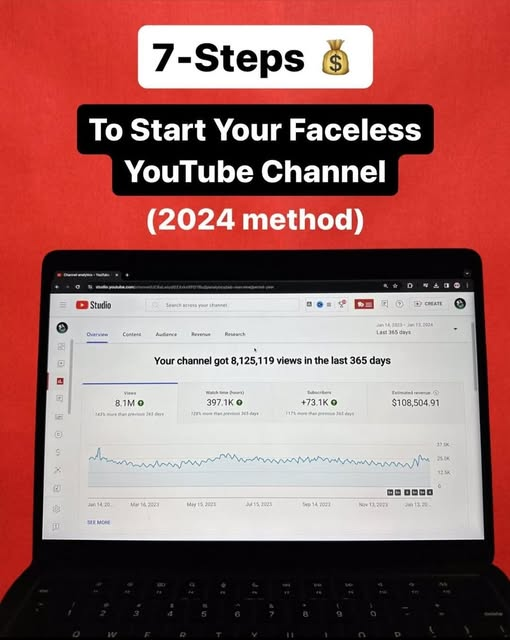
Once you hit 1,000 subscribers and 4,000 watch hours, you unlock YouTube Partner Program (ad revenue). But that's just the start.
Diversify with AI:
- Affiliate marketing – Use AI to find products your audience actually wants
- Digital products – Sell courses, templates, or tools (use automation to deliver)
- Sponsorships – Brands use data to find creators. Your metrics matter.
The goal? Passive income streams that run on automation while you create.
The Automation Tech Stack (Start Here)
You don't need everything, but this is the essentials:
- VidIQ or TubeBuddy ($10-20/mo) – Algorithm & keyword research
- ChatGPT/Claude ($20/mo) – Script generation
- Synthesia or HeyGen ($15-30/mo) – Video generation
- Eleven Labs ($11+/mo) – Premium voiceovers
- Canva Pro ($120/yr) – AI-assisted design
- CapCut or DaVinci Resolve (free or $20/mo) – Editing
Total investment? About $80-150/month. Your first monetized video pays for that in a week.
Why Most Creators Fail (And How AI Fixes It)
Problem: Inconsistent uploads. Solution: Batch-create content. Write 10 scripts one day, generate videos throughout the week, schedule them. Automation handles the heavy lifting.
Problem: No data strategy. Solution: Use VidIQ/TubeBuddy from day one. Every decision is backed by what the algorithm rewards.
Problem: Burnout from editing. Solution: Let Synthesia or HeyGen generate videos automatically. You focus on ideas, not grunt work.
Problem: Not knowing what to create. Solution: AI tells you what's trending, underserved, and profitable. Copy the formula, not the content.
Real Timeline: Zero to Monetized
Week 1-2: Choose niche with TubeLab, set up channel, create first 3 videos.
Week 3-8: Publish 1 video weekly, optimize based on analytics, test thumbnails.
Month 3-6: Hit 1,000 subs, apply for monetization, launch affiliate links.
Month 6+: Scale to multiple uploads per week, diversify revenue, let automation run the show.
With AI automation? You can compress this timeline. The barrier isn't talent or money anymore—it's understanding the system.
FAQ
Do I need to be on camera to start a YouTube channel?
Nope. Faceless channels using AI voiceovers and automated video generation are dominating right now. Tools like Synthesia and HeyGen handle the "talent" part. You focus on ideas and strategy.
How much does it cost to automate a YouTube channel?
$80-150/month for a solid tech stack (AI voiceover, video generation, keyword research). Your first monetized video covers this. ROI is usually within 2-3 months if you choose the right niche.
Will YouTube penalize me for using AI?
YouTube doesn't care how you make the video—only that it's good. If your AI-generated content has higher watch time and engagement than hand-made content, the algorithm loves it. Disclose AI use if required by law, but it's not a penalty.
How long until I make money?
YouTube Partner Program requires 1,000 subs and 4,000 watch hours in the last 12 months. With consistent posting and algorithm optimization, expect 3-6 months. Affiliate/sponsorship revenue can start sooner if your niche is profitable.
What niche should I pick?
Let data decide. Use TubeLab to find niches where search volume is high but competition is low. AI tutorials, productivity hacks, and automation content are underserved right now. Pick something evergreen (stays relevant) not trendy.
Can I really automate the entire process?
Almost. Write a script → AI generates voiceover → AI generates video → You edit thumbnails and titles → Schedule publish. The 20% you can't automate? The strategy. Pick what to create, not how to create it.
Do I need to know editing software?
Not with AI tools.