Gmail Now Auto-Enables Gemini AI for All Users—Here's Your Privacy Reality Check
Google quietly auto-enabled Gemini AI features in Gmail for all users, scanning your emails for smart summaries and draft suggestions without explicit consent. Here's what you need to know about the privacy trade-off and how to take back control.

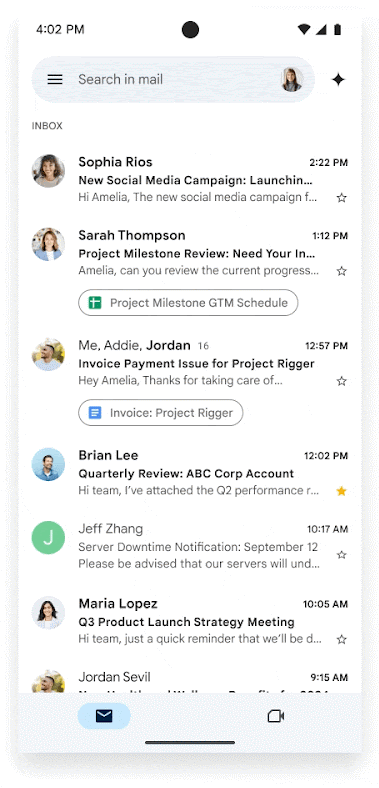
Gmail's Gemini AI Auto-Opt-In: The Privacy Wake-Up Call Your Inbox Needed
Google just made a power move that's rewriting the rules of email privacy. Gemini AI is now live in Gmail for everyone, automatically enabled, scanning your messages for smart summaries, auto-drafted replies, and personalized suggestions. The catch? You probably didn't consent to any of this. Your work emails, medical records, client pitches, and personal conversations are now feeding Google's AI model—unless you manually dig into settings and flip toggles most users never knew existed.
By YEET Magazine Staff | Updated: May 13, 2026
This is the inflection point where workplace productivity meets privacy erosion. AI promises convenience and efficiency. But that convenience comes at a cost: your data becomes the fuel.
What Actually Changed—And When
Google didn't announce a flashy new feature rollout. Instead, they quietly flipped a switch. Gemini features in Gmail—powered by their latest AI model—went live as default-enabled functionality. Most Gmail users opened their inbox one day and noticed a new AI sidebar offering to summarize threads, draft messages, and suggest responses.
For context: this is different from optional AI features. This is opt-out, not opt-in. And that distinction is everything.
Personal Gmail accounts got hit first. Google Workspace users (the enterprise tier) faced more complicated rules depending on their plan. Some admins can disable Gemini organization-wide. Others can't. It depends on your subscription tier—which means some employees literally can't turn off the AI reading their work emails.
The Real-World Impact: Meet the Users Who Woke Up to This
Case Study 1: The Freelancer's Realization
Sarah, a freelance consultant managing contracts and sensitive client files via Gmail, logged in and saw a new AI panel. It was already reading her emails, pulling summaries from months of correspondence. She checked Settings → See all settings → General and found the culprit: "Google Workspace smart features" was toggled ON. She never enabled it.
She disabled it immediately. But here's the kicker: turning off Gemini also disabled some legitimate conveniences, like automatic calendar event extraction from emails. The trade-off hits different when it's forced on you.
Case Study 2: The Corporate Compliance Nightmare
A legal team using Gmail discovered Gemini was analyzing attorney-client privileged emails. Their emails contained sensitive case details, settlement discussions, and confidential strategy. Google's AI was processing all of it by default. The firm immediately escalated to their IT department, but their Workspace plan didn't offer straightforward opt-out options. They had to push back to Google to get clarification on data handling.
This scenario is repeating across industries: healthcare, finance, legal, HR—anywhere email contains sensitive, regulated information.
The Privacy Trade-Off Nobody Asked For
Email Content Scanning: When Gemini is enabled, Google's AI models actively read, analyze, and index your email content. This happens in real-time. Every message you send or receive is processed.
Default Opt-In (Not Opt-Out): This is the controversial part. Users report they were never asked. The feature just appeared as enabled. That violates basic consent principles—especially in regulated industries where explicit consent is legally required.
Limited Control for Enterprise Users: If you work at a company using Google Workspace, you might not have the ability to disable Gemini yourself. Your admin controls it. And depending on your plan, your admin might not have granular controls either.
New Security Vulnerabilities: Researchers discovered that attackers can hide malicious prompts inside emails—using white text on white background, invisible to human readers. When Gemini scans these emails, it reads the hidden instructions and can be tricked into displaying fake security warnings, phishing alerts, or other misleading information. This attack vector only exists because AI is now reading email content.
Data Retention Questions: Google's official stance: Gemini summaries and drafts aren't stored separately or used for training on personal accounts. But the scanning happens. The processing happens. And for Workspace accounts, the rules are murkier depending on your admin's configuration.
The Bigger Picture: AI Default Settings Are the New Privacy Battleground
This isn't really about Gmail. It's about a pattern. Microsoft did the same thing with Copilot integration. Apple pushed Siri deeper into iOS. Amazon expanded Alexa's listening. The trend is consistent: AI features roll out as default-enabled across the entire ecosystem.
Why? Because default settings have overwhelming power over user behavior. Research shows that 90% of users never change default settings. So when companies make opt-out the default instead of opt-in, they're basically capturing everyone.
Google knows this. They're betting that convenience outweighs privacy concerns for most users. And statistically, they're right—most people won't disable Gemini. It'll just sit there, reading their emails, making their inboxes slightly more efficient, and feeding one of the world's largest AI datasets.
How to Take Back Control: The Opt-Out Guide
For Personal Gmail Accounts:
- Open Gmail on desktop (mobile has limited settings access)
- Click the Settings gear icon in the top right
- Select "See all settings"
- Go to the "General" tab
- Scroll down to "Google Workspace smart features"
- Uncheck both toggles:
- "Smart features in Google Workspace"
- "Smart features in other Google products"
- Scroll down and click "Save changes"
Once disabled, Gemini will stop analyzing your new emails. Old summaries and drafts will disappear from your interface.
For Google Workspace (Corporate) Accounts:
This depends on your plan and admin configuration. Some options:
- Check with your admin: Ask if your organization has disabled Gemini organization-wide. Some companies are doing this for compliance reasons.
- Personal account settings: Even if your admin allows it, you can still try the above steps. Whether they work depends on your Workspace plan tier.
- Escalate if needed: If your role involves sensitive data (legal, healthcare, finance), request that your IT department disable Gemini at the organization level.
For the Privacy-Conscious: Additional Steps
- Review your Data & Privacy dashboard at myaccount.google.com
- Check Manage your Google Account → Data & Privacy → Web & App Activity to see what Google is storing
- Consider alternatives: Proton Mail, Tutanota, or self-hosted solutions offer end-to-end encryption
- Use a separate email account for sensitive matters (legal, medical, financial)
FAQ: Everything You're Probably Wondering
Q: Is Google using my emails to train Gemini?
A: On personal accounts, Google says no—Gemini features use on-device processing or cloud processing that isn't used for model training. But the scanning still happens. The data is still processed. On Workspace accounts, policies vary by plan and admin configuration. Read your organization's data policies to be sure.
Q: Will disabling Gemini hurt my Gmail experience?
A: You'll lose smart summaries, auto-drafting, and contextual suggestions. You'll keep basic email functionality. Some users report losing convenience features like automatic calendar event extraction. The trade-off depends on how much you value those features versus privacy.
Q: Can my employer force me to use Gemini?
A: If you're on a corporate Workspace account and your admin enables it, you might not be able to disable it individually. You'd need to request admin-level disabling. If your company deals with sensitive data, this is a legitimate compliance concern to escalate.
Q: What about the prompt-injection vulnerability?
A: It's real. Attackers can hide malicious instructions in emails (invisible text, encoded characters) that Gemini reads and acts on. Google is aware and likely working on fixes. But the vulnerability exists because AI is now reading email content. It's a new attack surface.
Q: Is this illegal?
A: In most of the US, no. Google's terms of service cover this. But in the EU (GDPR), UK (UK GDPR), and California (CCPA), there are stricter consent requirements. Some legal experts argue that default opt-in violates these regulations. We'll likely see litigation.
Q: What should I do if I handle sensitive data?
A: Disable Gemini immediately. Consider using a separate email account or service for truly sensitive communications. If you work in legal, healthcare, or finance, escalate to your compliance and IT teams. Make them aware of the AI scanning and its implications for regulatory requirements.
The Takeaway: AI Integration Is Here—And You Need to Opt Out Intentionally
Google's move with Gemini isn't unique or surprising. It's the template for how AI will be integrated into every platform we use. Default-enabled. Quietly rolled out. Convenient enough that most people don't care. And profitable enough for companies to keep pushing.
The privacy cost is real. The consent model is broken. And the only way to maintain any control is to actively opt out—over and over again, across every service, every update, every new AI feature.
That's exhausting. But it's the reality of working in 2025.
Take action: Check your Gmail settings today. If Gemini is enabled and you care about privacy, disable it. Then check back every few months—companies have a pattern of re-enabling these features after updates.
Your inbox. Your data. Your choice. For now.
Have you discovered Gemini already enabled in your Gmail? Share your experience in the comments. How are you handling the privacy implications?