
ChatGPT Can Now Browse the Web: Everything You Need to Know About Search, Atlas, and Agent Mode
ChatGPT Atlas, Agent Mode, AI web browsing, OpenAI 2026 updates, autonomous AI agents, ChatGPT search features, AI browser automation.

ChatGPT Can Now Browse the Web: Everything You Need to Know About Search, Atlas, and Agent Mode

ChatGPT can now browse the web — and it's a game-changer for how we search, research, and get work done online. ChatGPT web browsing, ChatGPT search, ChatGPT Atlas browser, OpenAI web search, ChatGPT agent mode, browse with ChatGPT, real-time AI search, ChatGPT internet access, and ChatGPT current events — these are the searches dominating tech news right now. OpenAI has transformed ChatGPT from a chatbot with static knowledge into a dynamic AI assistant that can access and interact with the live internet in real-time. Read more ChatGPT news →
According to OpenAI, ChatGPT's web search capability is now available to all users — Free, Plus, Pro, Team, Edu, and Enterprise. The feature allows ChatGPT to pull in the latest information from the internet directly into your conversations, going beyond the assistant's built-in training data that previously cut off in September 2021. This means you can ask about breaking news, market trends, competitor activity, or niche details not included in its training data. Read more AI trends →
Master AI Tools in 2026
Books and resources on ChatGPT, AI search, and maximizing productivity with AI assistants.
Shop AI & Tech Books →How ChatGPT Web Search Works
ChatGPT search allows the AI to pull in real-time information from across the internet. When you ask a question that requires current data — like "What are the top three AI trends in healthcare in 2026?" — ChatGPT can now search the web and provide up-to-date answers with citations.
To use search, open a new chat in ChatGPT and ask a question that requires current information. You can also click the "Web Search" option from your tools menu. ChatGPT will automatically search the web when it determines your question would benefit from current information.
Look for the small globe icon 🌐 next to the model's response — this indicates that web search was used. You can click the citation links in the response to review the original sources. Follow up with clarifying prompts like "Summarize this in 3 bullet points for executives" or "Turn this into a customer-facing email draft."
ChatGPT Atlas: The AI-Native Browser
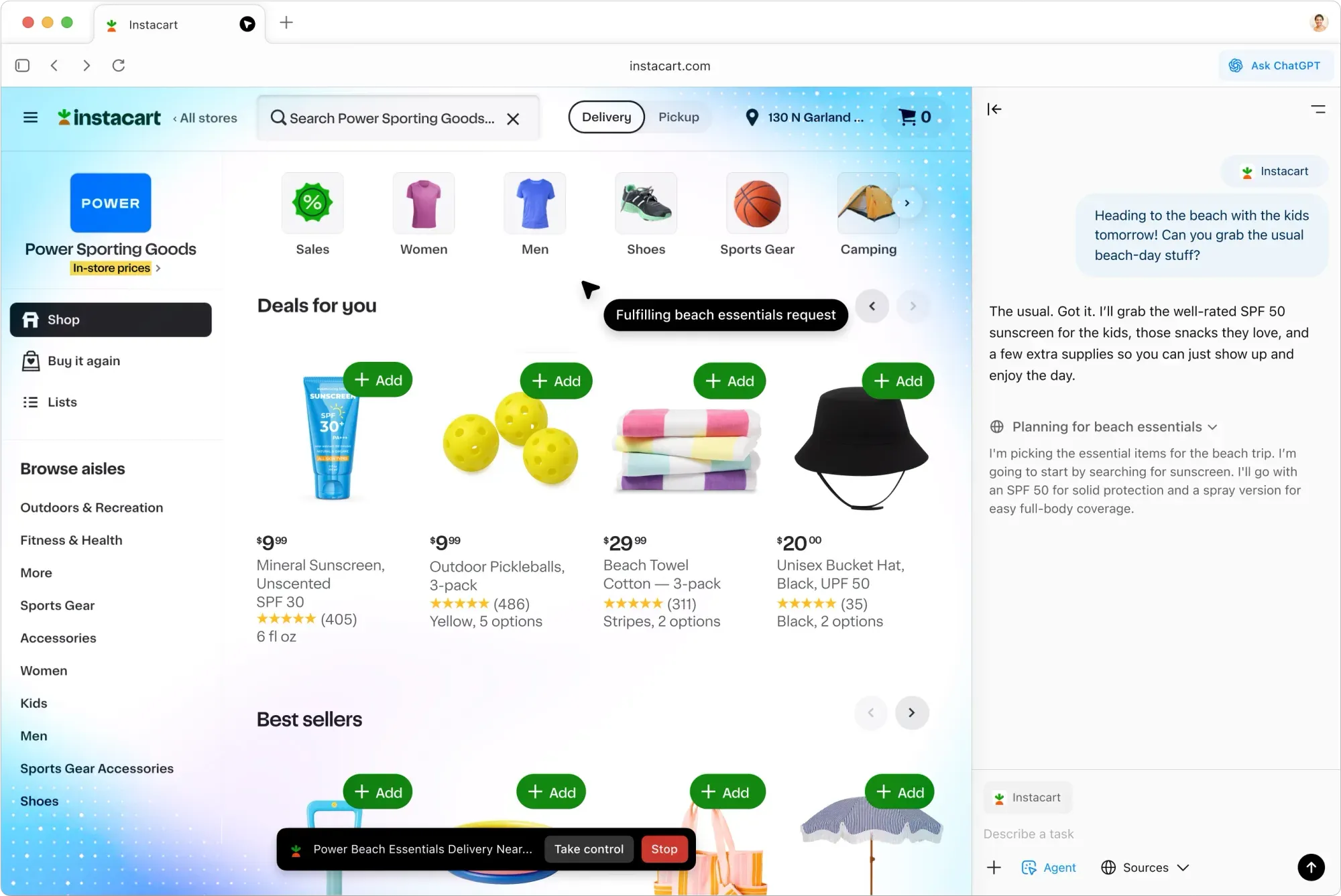
OpenAI has gone a step further with ChatGPT Atlas — a standalone web browser built with ChatGPT at its core. Announced in October 2025, Atlas is available for macOS, with Windows, iOS, and Android versions coming soon.
Atlas is not just a browser with an AI extension — it's a complete browser where ChatGPT is deeply integrated into the browsing experience. CEO Sam Altman described it as "a rare once-a-decade opportunity to rethink what a browser can be."
Key features of Atlas include:
- Ask ChatGPT Sidebar: On any webpage, you can pop open a ChatGPT sidebar to get a summary, extract key points, compare claims, or ask follow-ups without leaving the page. The sidebar automatically understands what you're viewing.
- AI Search: Open a new tab and type in natural language. Atlas returns a ChatGPT answer up top, alongside quick access to traditional results with tabs for links, images, videos, and news.
- Browser Memories: ChatGPT can remember key details from content you browse to improve chat responses and offer smarter suggestions — like creating a to-do list from your recent activity or continuing to research holiday gifts based on products you've viewed.
- Inline Writing: Whenever you're in a text field — email form, help desk ticket, contact form — you can call ChatGPT inline to draft or polish text.
ChatGPT Agent Mode
Agent mode is the most powerful feature of ChatGPT's web browsing capabilities. Available in preview for Plus, Pro, and Business users, agent mode allows ChatGPT to perform multi-step, web-based tasks on your behalf.
With agent mode, ChatGPT can:
- Research and analyze complex topics
- Book appointments, flights, and restaurants
- Add items to shopping carts and complete purchases
- Create spreadsheets and presentations
- Plan itineraries and trip logistics
- Compare products and services across multiple sites
According to OpenAI, the agent uses a new model called Computer-Using Agent (CUA) that combines GPT-4o's vision capabilities with reinforcement learning. It can understand screen elements like buttons, menus, and text boxes, and simulate human actions like mouse clicks, keyboard input, and scrolling.
When you ask ChatGPT to perform a task, it may ask if it should start opening tabs and clicking in your browser to complete the task. You can also select the agent mode button to have ChatGPT start. The agent pauses for sensitive actions and keeps you in control at all times.
Level Up Your AI Workflow
Ergonomic gear, productivity tools, and accessories for working with AI assistants.
Shop Productivity Gear →Privacy and Data Controls
OpenAI has built privacy controls into ChatGPT's web browsing features. By default, OpenAI does not use the content you browse to train its models. You can opt in to include browsing content for training under data controls settings.
Key privacy controls include:
- Browser Memories: You can turn browser memories on or off. When on, you can view, archive, or delete memories at any time in settings. Clearing your browsing history deletes any associated memories.
- Per-Site Toggles: You can decide which sites ChatGPT can or can't see using the toggle in the address bar. When visibility is off, ChatGPT can't view the page content and no memories are created from it.
- Incognito Mode: Open an incognito window to temporarily log out of ChatGPT. In incognito, you are signed out of ChatGPT, chats aren't saved to your account, and won't create Memories.
- Location Sharing: ChatGPT can optionally use your device location to provide more relevant results. Location sharing is optional and default off.
Search vs. Deep Research
OpenAI offers two ways to search the web: Search and Deep Research.
- Search: Quickly retrieves specific facts, documents, or recent information. Returns concise results in seconds. Best for well-defined, specific queries like "What was the attendance at last year's summer Olympics?"
- Deep Research: Conducts multi-step, in-depth analysis on complex questions that require reasoning and synthesis across multiple sources. Produces long-form, evidence-backed summaries with citations. Takes 5-30 minutes. Best for open-ended questions like "What factors influence attendance at large international sporting events?"
Use Cases for ChatGPT Web Browsing
ChatGPT's web browsing capabilities are useful across many roles and industries:
- Marketing Managers: Research the latest social media algorithms and adapt campaign strategies
- Product Managers: Track competitor launches and industry announcements
- Financial Analysts: Pull the most recent market data, interest rates, or quarterly earnings
- Students: Get quick summaries and citation leads from long readings
- Business Professionals: Research, analyze, and compile insights into team briefs
- Travel Planners: Research and book trips, compare options, and create itineraries
Secure Your Browsing
Protect your privacy and data with top-rated security tools and VPNs.
Shop Security & VPN Gear →FAQ: ChatGPT Web Browsing
Q: Can ChatGPT browse the web now?
A: Yes. ChatGPT can search the web in real-time. The feature is available to all users — Free, Plus, Pro, Team, Edu, and Enterprise.
Q: Is ChatGPT web search free?
A: Yes. ChatGPT search is now available to all Free users, as well as paid tiers.
Q: What is ChatGPT Atlas?
A: ChatGPT Atlas is a standalone web browser built with ChatGPT at its core. It's available for macOS with Windows, iOS, and Android versions coming soon.
Q: What is Agent mode in ChatGPT?
A: Agent mode allows ChatGPT to perform multi-step web-based tasks on your behalf, such as booking appointments, researching, shopping, and creating documents. Available in preview for Plus, Pro, and Business users.
Q: Does ChatGPT web search include citations?
A: Yes. ChatGPT provides direct links to sources and inline citations that you can click to review original sources.
Q: Can I control what ChatGPT sees when browsing?
A: Yes. You can control per-site visibility, clear browsing history, use incognito mode, and manage memories in settings.
Related Stories
- ChatGPT: Complete Guide and Updates
- AI Trends 2026: What's Next
- OpenAI News: Latest Developments
- Gemini vs ChatGPT: Which AI Assistant is Better?
- Future of Work Trends 2026